Evinor is now on n8n. Our new community node, the Evinor Trigger, starts a workflow when something happens in the world that you care about: a target account raises money, a new executive starts at a customer, a company on your beat gets acquired.
You pick a sensor and publish the workflow. There are no webhook URLs to copy between products, no signing secrets to store and no verification code to write. Each event arrives as structured fields, ready to map into your CRM, your Slack channels or your content calendar.
What the node gives you
An Evinor sensor watches for a kind of real-world event: funding rounds, acquisitions, layoffs, leadership changes, product launches, partnerships, IPOs, job openings and security advisories. You can narrow it to the companies you follow, to a watchlist of accounts or to what a role says.
The node connects one of those sensors to your workflow:
- Publishing the workflow connects it. The node registers the workflow’s webhook with the sensor for you.
- Unpublishing removes it. Nothing keeps sending to a workflow you have turned off.
- Every delivery is verified. The node checks the signature, the key and the timestamp before anything runs. A delivery that fails is rejected and the workflow never starts.
Set it up
You need an Evinor account with at least one sensor, and an n8n instance where you are an owner or admin.
- Install the node. On the canvas, open the nodes panel, search for Evinor and install it. On self-hosted n8n you can also go to Settings → Community Nodes and enter
@evinor/n8n-nodes-evinor. - Create an API key. In Evinor, go to Developers → API keys and create a key with Read sensors and Write sensors. Add it to n8n as a new Evinor credential.
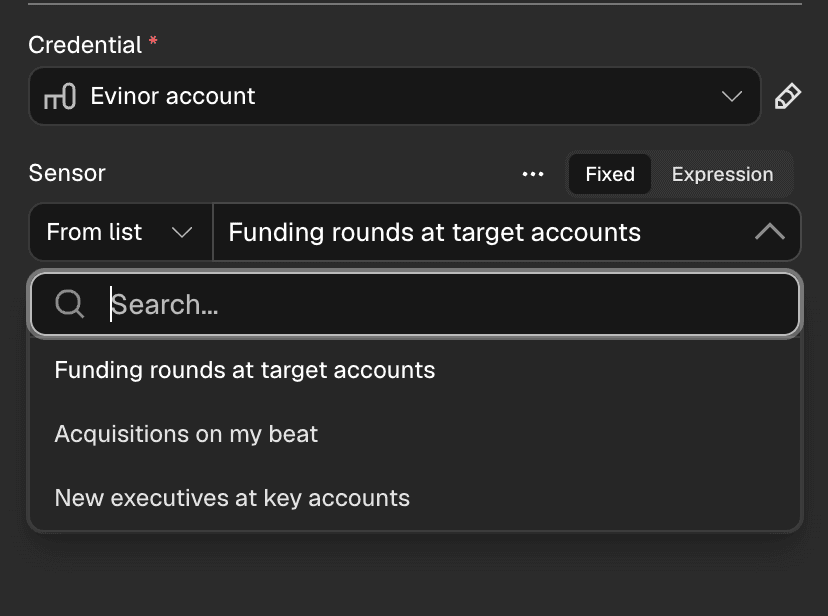
- Pick a sensor. Add the Evinor Trigger to a workflow and choose a sensor from the list.
- Send yourself a test event. Click Execute step. A few seconds later Evinor sends one sample event, so you have real field names to map. Sample events are marked
isTest: trueand never touch a live connection. - Publish the workflow. From then on, every match runs it.
What arrives in your workflow
Turn on Simplify and each event comes through as flat, readable fields. Here is a real funding round from our test run:
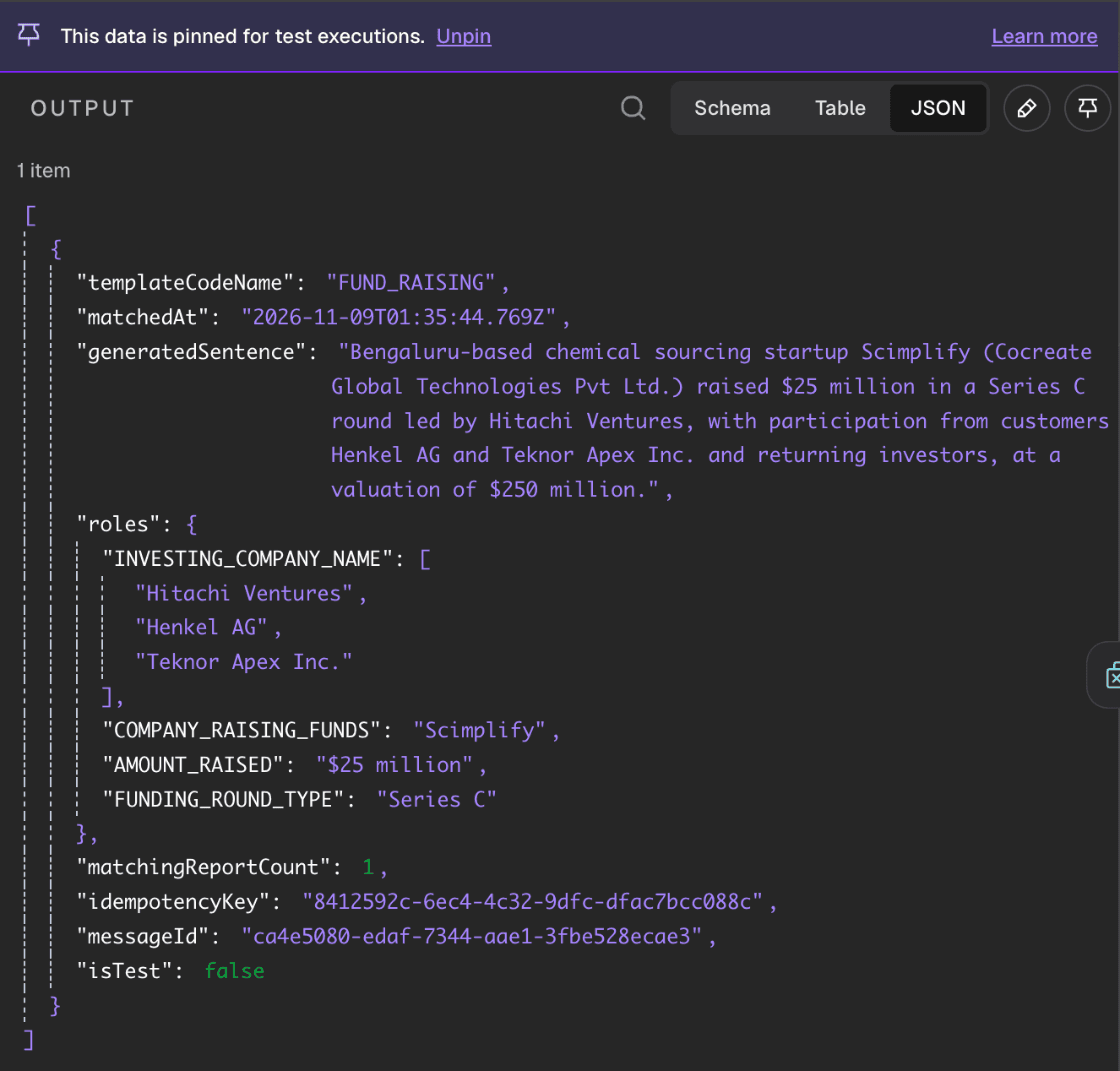
Three fields do most of the work:
rolesholds the facts. Reference them like any other field:{{ $json.roles.COMPANY_RAISING_FUNDS }}. A role that can repeat, such as the investors in a round, arrives as a list when it has more than one value.generatedSentenceis a plain-English summary, ready to drop into a Slack message or an email.idempotencyKeyidentifies the delivery, which matters for the next section.
The roles for each kind of event are listed in the event types reference.
Three workflows to copy
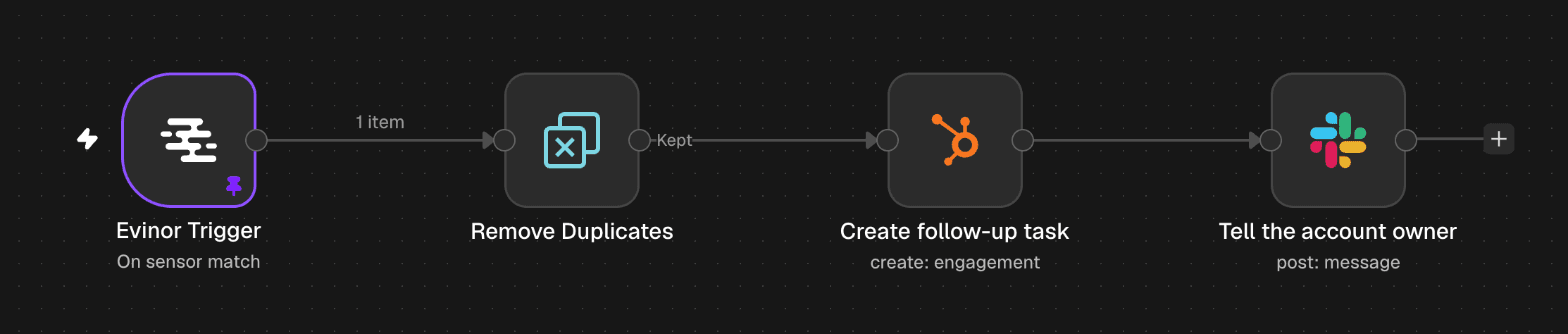
Each of these starts the same way: an Evinor Trigger, then n8n’s Remove Duplicates node comparing {{ $json.idempotencyKey }} against previous executions. Evinor retries a delivery when it can’t confirm it arrived, so the same event can occasionally reach you twice. Remove Duplicates keeps that from creating two tasks.
Sales: reach out when an account raises money
A company that has just raised has new budget and new priorities, and the first useful message tends to get read. Upload your target accounts to Evinor as a watchlist and create a funding-round sensor that follows it. This is the workflow at the top of this post. A HubSpot node creates a follow-up task named {{ $json.roles.COMPANY_RAISING_FUNDS }} raised {{ $json.roles.AMOUNT_RAISED }}, and a Slack node posts generatedSentence to the account owner.
RevOps: catch a new executive at a key account
When a new leader starts at an account, your champion may have changed and your routing may be out of date. A leadership-change sensor on your key accounts catches it when it is reported. Here, a Filter node keeps titles containing “VP” or “Chief,” HubSpot flags the account, and Slack tells RevOps.

You can also move that filter into the sensor itself, so n8n only hears about the titles you want. See filtering by what a role says.
Content: turn news on your beat into a draft
If you run media accounts or a newsletter, you want to be early without living in your feeds. Point an acquisition sensor at the companies you cover. An OpenAI node drafts a post from generatedSentence, Notion adds it to your content calendar, and Slack asks an editor to review it.

We put the editor there on purpose. Evinor reads the news and extracts events from it, and any automated reading can get something wrong. For anything that goes out under your name, keep a person in the loop.
Get started
Search for Evinor in your n8n nodes panel, or read the setup guide for the details. The node is open source and on GitHub. If you build something with it, or a workflow you want isn’t possible yet, we’d like to hear about it.