A customer asked us for something that sounds simple. They wanted an alert on executive changes, but only the ones where the person’s new position is data-related. A new “Head of Data.” A new “VP, Analytics.” Not every executive change at every company they follow.
Until now, sensors and beats couldn’t say that. They could filter an event by who was involved, by an amount or by a date, but not by what a role actually says. Today that changes. Sensors, beats and event search can now filter on the words inside a role, and on the category a role falls into.
First, what a role is
Every event Evinor extracts has a set of roles: the structured facts that make it up. A product launch has a company, a product and a launch type. An executive change has a person, a company and a position. Each role holds a value. Some values point at an entity (a company, a person), some are amounts or dates, and some are plain text or a choice from a fixed list.
Role filters already let you narrow a sensor by the first kinds: “a deal of at least $50M,” “announced after March.” The text-and-choice roles were the gap. You could see them on every event and you couldn’t filter on them.
Free text: match on words
The first new filter is text contains. Pick a role, give it one or more terms, and an event passes when that role contains any of them.
For the customer above, that is an executive-change sensor with the position role set to the terms data, analytics and machine learning. A “Head of Data” matches. A “Chief Financial Officer” doesn’t.

The matching is deliberately forgiving about form and strict about meaning:
- Whole words and phrases, not fragments.
datamatches “Head of Data” but not “Update.”aidoesn’t match “Chair.” A short term does what you expect instead of flooding you with accidents. - Case, accents and punctuation are ignored.
ctoandCTOare the same term, “Café” matches “cafe,” and “vice-president” matches “vice president.” - Any term is enough. List the synonyms you care about and an event passes if the role contains one of them.
- No regular expressions. You write words, not patterns, so a filter can’t be written wrong in a way that quietly matches nothing, or everything.
Categories: match on a choice
Some roles aren’t free text at all. They are a choice from a fixed list the event type defines. A product launch’s launch type is one of NEW_PRODUCT, NEW_VERSION_OR_GENERATION, FEATURE_ADDITION, CAPABILITY_EXPANSION, CONTENT_RELEASE or ACCESS_CHANGE. A job posting’s seniority is a level.
The second new filter, category in, lets you pick the values you want. A sensor for “product launches by my competitors, but only genuinely new products and new generations” stops being a compromise.
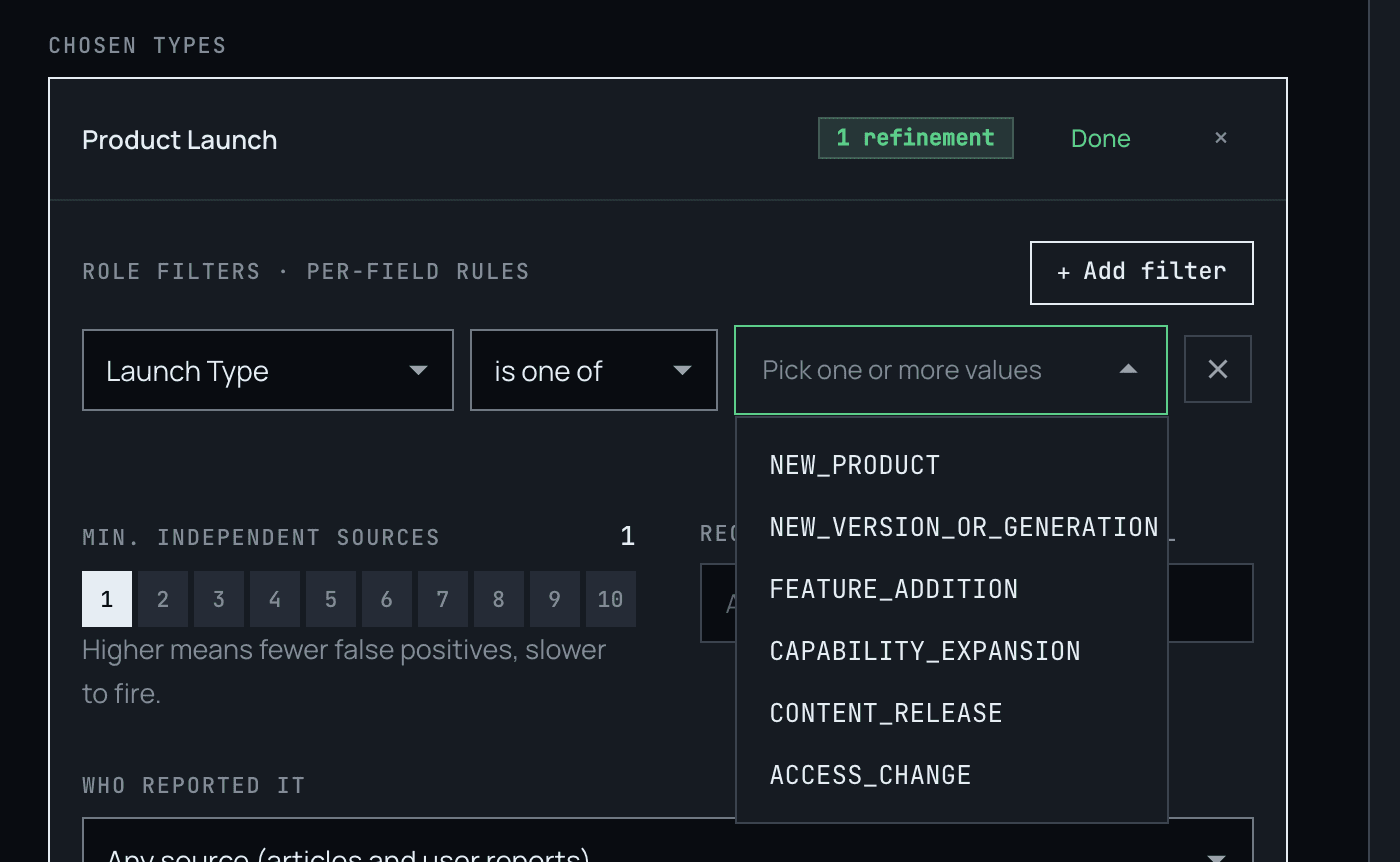
Because the choices come straight from the event type, there’s nothing to guess. Matching is exact, so a value either is the category or it isn’t.
When a category goes away
Event types evolve, and a category you chose last quarter may be retired. We don’t silently drop it. The value stays on your filter as a flagged chip that says it is no longer offered by that event type, so you can see exactly why a filter stopped matching and fix it. An existing rule that holds a retired value can still be saved while you work out the replacement.
See the effect before you save
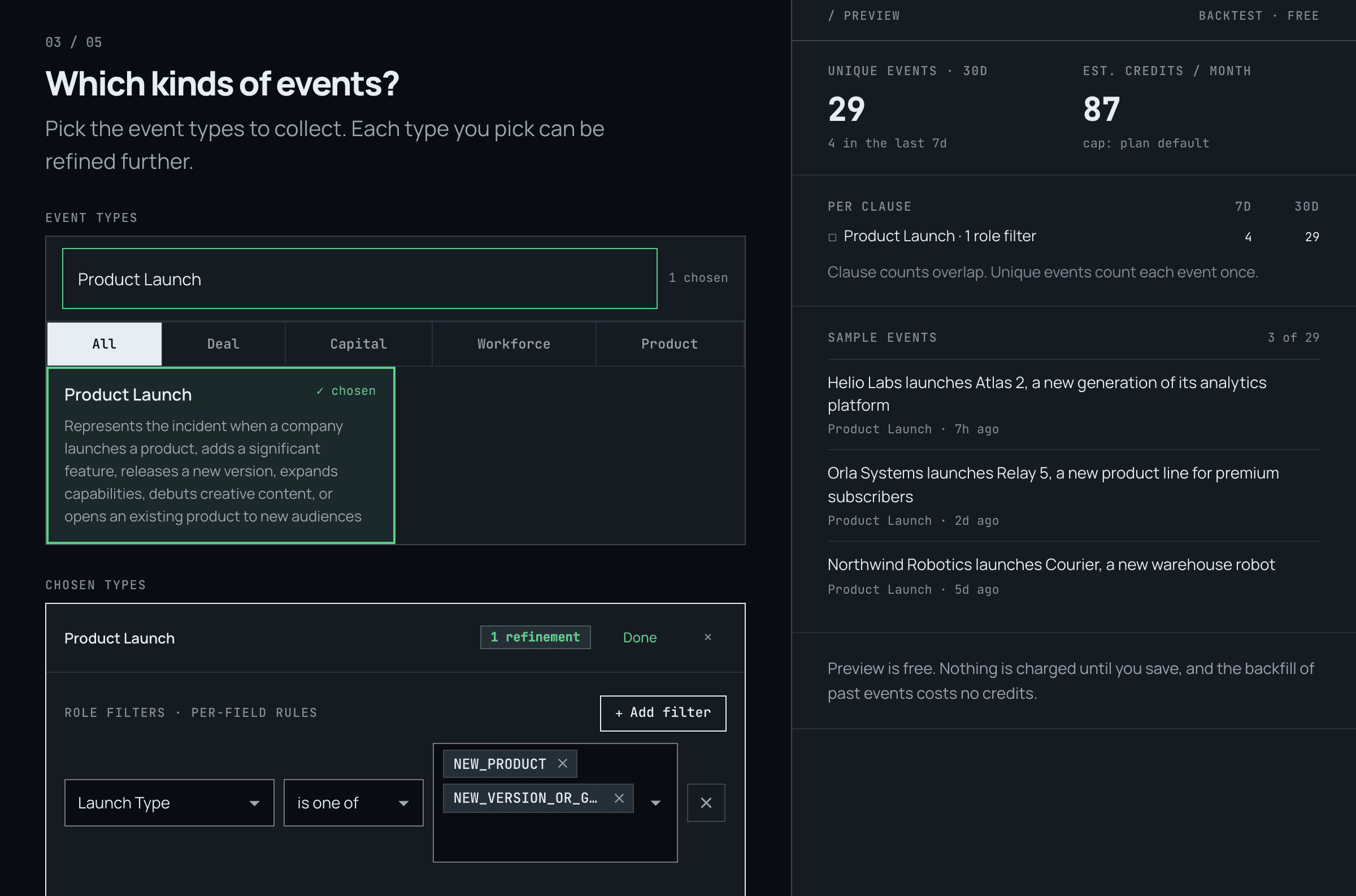
Both filters work with the live preview you already know from the sensor and beat wizards. As you add a term or tick a category, the preview re-counts how many events from the last 30 days would have matched, so you can tell a filter that is too tight from one that is too loose before it starts sending anything.
That preview and the real thing agree by construction. Live matching and the preview engine use the same text-folding rules, and we test that they return the same answer. A term that previews well will behave the same when it matters.
Where it works
The same two filters are available everywhere role filters already are:
- Sensors, in the wizard and the editor.
- Beats, on any clause, including the backfill that fills a new beat from recent history.
- Event search, for one-off lookups.
- The API and MCP, as
text_containsandcategory_inrole filters.
From code, a filter is a small object. This one matches events whose title role mentions a CTO or a technology title (the role names here are illustrative; use the ones your event type lists):
{
  "kind": "text_contains",
  "role_code_name": "ROLE_TITLE",
  "terms": ["chief technology officer", "CTO"]
}
And one for categories, on a stage role:
{
  "kind": "category_in",
  "role_code_name": "STAGE",
  "values": ["SEED", "SERIES_A"]
}
The available role names and each categorical role’s allowed values are listed on the event types endpoint. The API documentation has the full reference.
What to know
- Terms are matched as words. Punctuation becomes a space, so
co-foundermatches “co-founder” and “co founder,” but not “cofounder.” List both spellings if you need both. - Languages without spaces (Chinese, Japanese, Thai) have no word boundaries, so a term matches only a whole value.
- Size limits. Up to 20 terms per filter, each up to 64 characters, and up to 40 terms across a filter set. A category filter takes up to 100 values.
- It narrows; it doesn’t reinterpret. A filter reads the value Evinor extracted for the role. If you want events whose position doesn’t mention a term, that is a different shape of filter, and not one we offer yet.
Try it
Open any sensor or beat and add a role filter. Start with the event type you already follow, pick the role you wish you could narrow on, and watch the preview. If you haven’t built either yet, the introduction to Beats is a good place to start.